
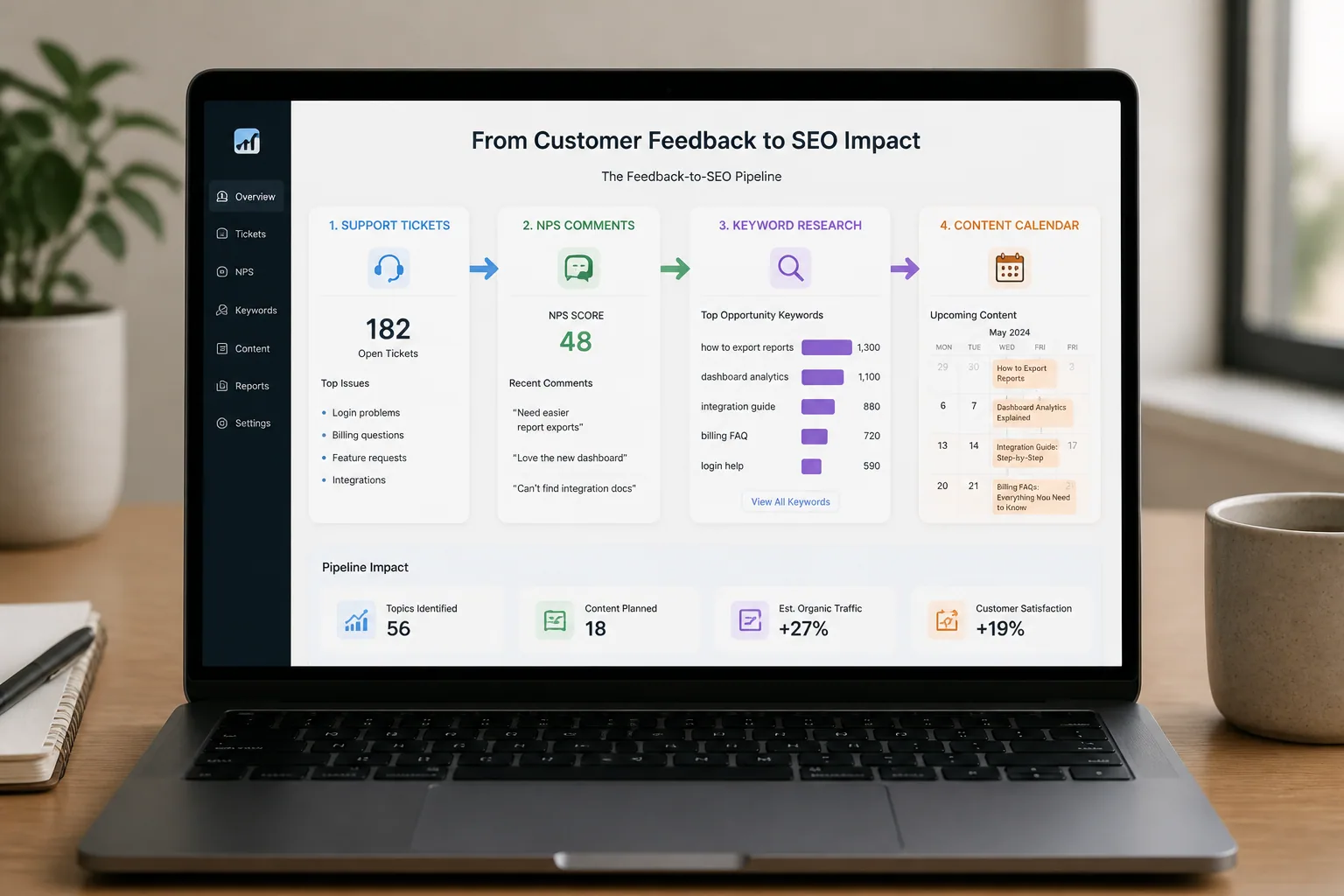
Most SaaS content teams have a traffic problem, but many also have a listening problem. They publish around broad keywords, competitor comparisons, and industry thought leadership, then wonder why rankings are inconsistent and pipeline attribution is hard to prove. The issue is often not effort. It is relevance. In fact, 74% of B2B companies report that content marketing increases lead generation, but generic content does not always turn into qualified demand. Prioritizing topics that solve real customer pain points instead of recycled industry ideas usually creates stronger results, better intent match, and more usable SEO assets. Source: Allied Insight https://alliedinsight.com/resources/guide-content-with-customer-feedback/
A customer-driven SEO pipeline fixes that by turning feedback into a repeatable source of keyword ideas, content briefs, and topic clusters. Instead of guessing what people want to read, you mine NPS comments, support tickets, chat logs, reviews, and feature requests for the exact language customers use when they are confused, blocked, skeptical, or ready to buy. That language becomes the raw material for content that ranks because it answers real search intent. It also helps solve a structural problem many teams face: 56% of B2B marketers say they cannot attribute ROI to their content efforts. When content is built around buyer signals and recurring feedback themes, attribution becomes much clearer because the content is tied to specific needs, stages, and outcomes. Source: PropSaaS Growth https://propsaasgrowth.com/blog/saas-content-strategy/
Why Customer Feedback Is an Untapped SEO Goldmine
Customer feedback is valuable because it reflects demand before keyword tools do. Search data tells you what people type, but feedback tells you why they are searching, what they already tried, and what frustrates them enough to ask for help. That context is what makes a topic worth investing in. Real feedback often reveals recurring pain points that are specific, repeated, tied to workflows, and framed by consequences or workarounds. Those are the themes most likely to justify content. Random complaints are less useful, but repeated friction around onboarding, integrations, reporting, billing, or implementation can become entire content clusters. Source: InsightScout https://www.insightscout.co/guides/how-to-find-customer-pain-points-online
There is also a commercial advantage. Content based on actual customer feedback closes the gap between what a brand thinks its audience wants and what the audience is actually asking. That matters for both keyword phrasing and topic relevance. A marketing team may want to write about “improving operational efficiency,” while customers are really asking, “Why does my workflow break when I sync this integration?” The second phrasing is much closer to a high-intent search query, and it signals a clearer opportunity for an article, landing page, or help guide. Source: ProfileTree https://profiletree.com/customer-feedback-for-content-strategy/
Where to Find High-Value Feedback: NPS, Support, Chat, Reviews, and Widgets
The best feedback sources are the ones where customers speak naturally and at scale. Start with NPS responses, support tickets, live chat logs, app reviews, post-purchase surveys, sales call notes, and feature requests. Each channel gives you a different layer of insight. NPS comments often reveal high-level satisfaction or dissatisfaction. Support tickets expose repeated blockers. Chat logs show objections in real time. Reviews surface competitive comparisons. Feature requests show what customers believe is missing from the product or experience.
If you want to create a dependable intake stream, collect feedback on-site as well. A lightweight widget can capture both the message and the context around it, which makes the data much more actionable. For example, Lite Feedback: Web Feedback Widget lets you gather free-form feedback from any website with a single line of code, and it automatically captures page, browser, operating system, device, and timezone context. You can learn more here: https://litefeedback.com/
That context matters because SEO content should be grounded in actual usage situations, not abstract frustration. When you know a request came from a pricing page on mobile or a tutorial on desktop, you can see patterns in where confusion starts and which pages may need supporting content. The goal is to build a feedback engine, not just a pile of comments.
How to Audit Feedback for Pain Points, Objections, and Customer Language
Once feedback is collected, the first job is not writing. It is sorting. You are looking for three things: pain points, objections, and customer language. Pain points describe the problem. Objections reveal hesitation or mistrust. Customer language gives you the exact terms people use to describe the issue. That phrasing is often far more useful than the internal terminology your team uses.
A practical audit method is to tag every piece of feedback by theme, urgency, workflow stage, and sentiment. Then look for repetition. If the same frustration appears across support, chat, and reviews, it probably represents a real content opportunity. If it only appears once, it may be an edge case or a product issue that does not need an SEO article. Structured interviews can also help here. In customer pain point research, structured interviews produce 3 to 5 times more actionable insights per hour than unmoderated surveys. Source: Koji https://www.koji.so/docs/customer-pain-points-research
The most useful audit questions are simple: What is the customer trying to do? Where do they get blocked? What workaround are they using? What do they fear will happen if they do it wrong? Those answers make it much easier to turn raw feedback into content themes that can rank and convert.
Turning Raw Feedback Into Searchable Topic Themes
After you tag and cluster feedback, convert the patterns into searchable themes. A theme is broader than a single comment but narrower than a generic category. For example, instead of “onboarding,” you might get themes like “how to import data without errors,” “why setup fails on mobile,” or “how to connect a CRM without losing fields.” These themes are strong because they are concrete, repeated, and already aligned with real customer intent.
This is where question-based phrasing becomes especially useful. Queries like “how to fix,” “why is my,” “what to do when,” and “how do I connect” often show stronger urgency than broad topic keywords. They reflect immediate problems and tend to convert better because the searcher is looking for a direct answer. Source: MicroNicheBrowser https://www.micronichebrowser.com/blog/how-to-find-question-based-keywords-that-reveal-customer-pain-points
A good rule is to rewrite each feedback theme as a search question. If customers keep saying they are confused about permissions, the content theme might become “how to fix permission errors in [product name]” or “why team members cannot access shared dashboards.” That shift turns a vague complaint into a content brief you can actually optimize.
How to Validate Feedback Ideas With Keyword Research and Search Intent
Feedback alone is not enough. You still need validation. The best ideas sit where customer pain and search demand overlap. Start by checking whether the phrasing appears in keyword tools, search suggestions, competitor pages, and your own site search data. Then ask what intent sits behind the query. Is the searcher trying to learn, compare, troubleshoot, or buy? Your content format should match that intent, or the page will struggle to perform.
This is also where keyword volume can be misleading. A low-volume keyword that matches a repeated customer pain point may be far more valuable than a high-volume broad term with weak intent. The fastest-growing niche products often win by targeting specific workflows first. One research note suggests that a median micro-SaaS becomes profitable within four months when it targets a specific vertical workflow using feedback-driven keyword and niche topic research. Source: MicroNicheBrowser https://www.micronichebrowser.com/blog/how-to-find-question-based-keywords-that-reveal-customer-pain-points
Search intent validation should answer one question: does this theme deserve an article, a help page, a comparison page, or a product-led landing page? If the answer is unclear, look at the intent behind the top-ranking results. If the SERP is full of tutorials, do not force a sales page. If the SERP shows product comparisons and alternatives, a feature-focused page may fit better.
Finding Content Gaps Your Competitors Are Missing
One of the strongest benefits of feedback-led SEO is content gap discovery. Competitors usually publish around obvious keywords, but they often miss the edge cases and workflow-specific questions that customers actually ask. This is where your feedback corpus becomes a strategic advantage. If multiple customers ask the same question and competitors only mention it briefly, you can create the most useful page in the category.
A strong gap analysis has two parts. First, check whether existing content addresses the theme at all. Second, assess how well it addresses it. Some pages mention the issue but bury it deep in the text. Others rank poorly because they are too generic, too product-agnostic, or too shallow. In many cases, rewriting a low-ranking page is faster and more effective than creating something new. Source: ProfileTree https://profiletree.com/customer-feedback-for-content-strategy/
Feedback-derived gaps are especially powerful when they relate to trust barriers, clarity issues, or decision friction. Examples include security concerns, implementation fears, missing integrations, data migration questions, and pricing objections. These are often the exact points where a prospect stalls. Content that resolves them can improve SEO and conversion at the same time.
Building Topic Clusters From Recurring Customer Questions
Once you identify recurring themes, group them into topic clusters. A cluster starts with a pillar page that covers the core problem broadly, then branches into supporting articles that answer the most frequent and specific follow-up questions. This structure helps search engines understand topical depth, and it helps readers move from problem awareness to implementation and decision-making.
For example, a SaaS product with recurring feedback around reporting could build a pillar page on “How to Build Reliable Reports in [Category].” Supporting articles might cover data syncing issues, metric definitions, dashboard permissions, export formats, and common reporting mistakes. Each article answers a real customer question and reinforces the pillar’s authority.
ProfileTree notes that an editorial pipeline that tracks themes from feedback by journey stage, content gap, trust barrier, or clarity issue can help prioritize topics more effectively. That structure is useful because it keeps clusters organized around customer need instead of internal department silos. Source: ProfileTree https://profiletree.com/customer-feedback-for-content-strategy/
Creating Pillar Pages and Long-Tail Support Content That Ranks
Pillar pages should handle the broad problem, define the landscape, and link to the detailed articles that solve narrower questions. They are not meant to answer everything exhaustively. Their job is to establish topical authority and guide readers to the exact resource they need. Long-tail support content does the rest. It captures the specific, often question-shaped searches that convert because they map closely to urgent user intent.
A feedback-led pillar page might target “customer feedback management for SaaS teams,” while the long-tail pages target searches like “how to organize feature requests from customers,” “best way to categorize support tickets for SEO insights,” or “how to turn chat logs into content ideas.” Each long-tail article can satisfy a different stage of the funnel: awareness, evaluation, or decision.
This is also where your internal linking strategy becomes important. The pillar should link down to the support pages, and the support pages should link back up to the pillar. When done consistently, the cluster becomes an interlinked knowledge system that helps both users and search engines find the most relevant path through the topic.
Designing a Feedback-to-Content Workflow Your Team Can Repeat
A good pipeline is operational, not accidental. Feedback should flow into a shared system where it is tagged, reviewed, prioritized, and assigned. Start by routing all sources into one intake process. Then establish a taxonomy that includes theme, source, urgency, journey stage, and potential content format. This prevents valuable insights from getting lost in Slack threads or scattered spreadsheets.
The workflow should make ownership obvious. Product marketing can own theme validation, content can own briefs and drafting, SEO can own keyword and SERP analysis, support can flag recurring issues, and product can clarify whether a theme is primarily educational or product-related. The cleaner the handoff, the faster the content engine moves.
Tools that centralize and triage feedback can make this process much easier. Lite Feedback, for example, includes a Kanban workflow with statuses like New, Under Review, Planned, In Progress, and Done, along with tagging, filtering, and AI-assisted triage. That kind of setup helps teams keep the feedback pipeline visible and actionable without adding operational drag.
How to Prioritize Feedback Themes by Business Impact and SEO Opportunity
Not every recurring question deserves a new article. Prioritize themes based on two dimensions: business impact and SEO opportunity. Business impact includes churn risk, conversion influence, support cost, expansion potential, and strategic relevance. SEO opportunity includes ranking difficulty, search demand, and the ability to serve multiple related queries from one page or cluster.
A simple scoring model works well. Rank each theme by frequency, urgency, revenue relevance, content gap severity, and intent strength. Themes with high frequency and high commercial relevance should rise to the top. So should themes that can deflect support tickets or unblock evaluation-stage buyers. This is how you make the content calendar feel less like a wish list and more like an operational lever.
If a theme is widespread but low intent, it may be better suited to documentation or an in-app tooltip. If it is high intent but only mildly frequent, it could still be worth creating if it addresses a key trust barrier. The point is not to publish everything. The point is to publish the right things in the right order.
Assigning Owners, Publishing Faster, and Closing the Loop With Product and Support
The fastest teams do not just discover themes. They close the loop. Once an article or page is published, share it with support and product so they can use it in responses, onboarding, and product guidance. If the content resolves a recurring issue, support should know where to send users. If the issue is actually a product defect or UX problem, product should know the content exists and what it revealed.
This feedback loop improves more than efficiency. It creates a shared language across teams. Support hears what customers struggle with every day, product sees the underlying friction, and content turns those insights into discoverable assets. Over time, that loop raises both content quality and product clarity.
What to Track: Rankings, Organic Traffic, Engagement, Support Deflection, and Churn
If you want a feedback-driven SEO pipeline to survive, measure more than traffic. Track rankings and organic sessions, but also measure engagement signals like scroll depth, time on page, click-through to related content, and returning visits. Then connect content performance to operational metrics such as support deflection, ticket volume changes, assisted conversions, and churn-related signals.
That broader measurement model is important because content can be successful even when it does not immediately drive leads. A guide that reduces support volume or helps prospects evaluate your product more confidently can create real business value. And because many B2B teams struggle to attribute ROI directly, these secondary metrics help demonstrate impact more credibly. Source: PropSaaS Growth https://propsaasgrowth.com/blog/saas-content-strategy/
For high-performing topics, look for compound effects. A page may rank, attract qualified traffic, reduce repetitive questions, and speed up sales conversations all at once. That is the real payoff of content built from customer feedback.
Real-World Examples of Feedback-Led Content That Delivered Results
Consider a SaaS company that keeps getting support requests about failed CSV imports. Instead of treating each ticket separately, the team clusters the language, validates that people search for the same problem, and creates a guide on fixing import errors, mapping columns, and avoiding formatting mistakes. That page can rank for troubleshooting queries, reduce support load, and give sales a useful resource for prospects evaluating setup complexity.
Another example is a product with repeated objections around security and permissions. Feedback shows that prospects are unsure about access controls and audit logs. The content team builds a trust-focused pillar page with supporting articles on user roles, workspace permissions, and compliance explanations. The result is better alignment between customer questions and search intent, plus a stronger decision-stage content path.
This is the main strategic lesson: customer feedback does not just suggest topics. It exposes the exact moments where prospects hesitate and customers get stuck. That is where SEO content can create outsized value.
Common Mistakes That Break a Customer-Driven SEO Pipeline
The first mistake is treating all feedback as equal. A single angry comment should not outweigh five recurring issues across channels. The second mistake is overgeneralizing. If you turn a specific workflow problem into a vague industry article, you lose the intent signal that made the topic valuable in the first place. The third mistake is skipping keyword validation and publishing content that sounds helpful but does not match search behavior.
Another common failure is ignoring ownership. If no one is responsible for moving insights from support into editorial planning, the pipeline stalls. Teams also get stuck when they create too much new content instead of refreshing pages that already have some visibility. Sometimes the fastest win is improving an existing article that is close to ranking but not quite answering the customer question fully.
Finally, do not forget the product. If feedback keeps pointing to an actual UX or feature problem, content can help, but it should not become a substitute for fixing the underlying issue. The strongest pipelines use content to educate, support, and convert, while also sending product signals upstream.
Your 30-Day Plan to Launch a Customer-Driven Content Engine
In the first week, gather feedback from your main sources and centralize it in one place. In the second week, tag for themes, pain points, objections, and customer language. In the third week, validate the best themes with keyword research and SERP review. In the fourth week, build one pillar page or a small cluster around the highest-value recurring issue and assign owners for the next set of topics.
A simple launch goal is enough. Pick three recurring customer questions, one support-heavy pain point, and one high-intent objection. Turn them into a prioritized editorial queue, publish the first assets, and measure what changes in rankings, traffic, support volume, and engagement. Once you see the system working, repeat it every month. That is how feedback becomes a durable SEO asset, not a one-off experiment.